

Are Cheap Software Keys Legit? How to Buy Genuine Licenses Safely in 2026
June 21, 2026
How to Activate Office 2024 With a Product Key (Step-by-Step 2026)
June 26, 2026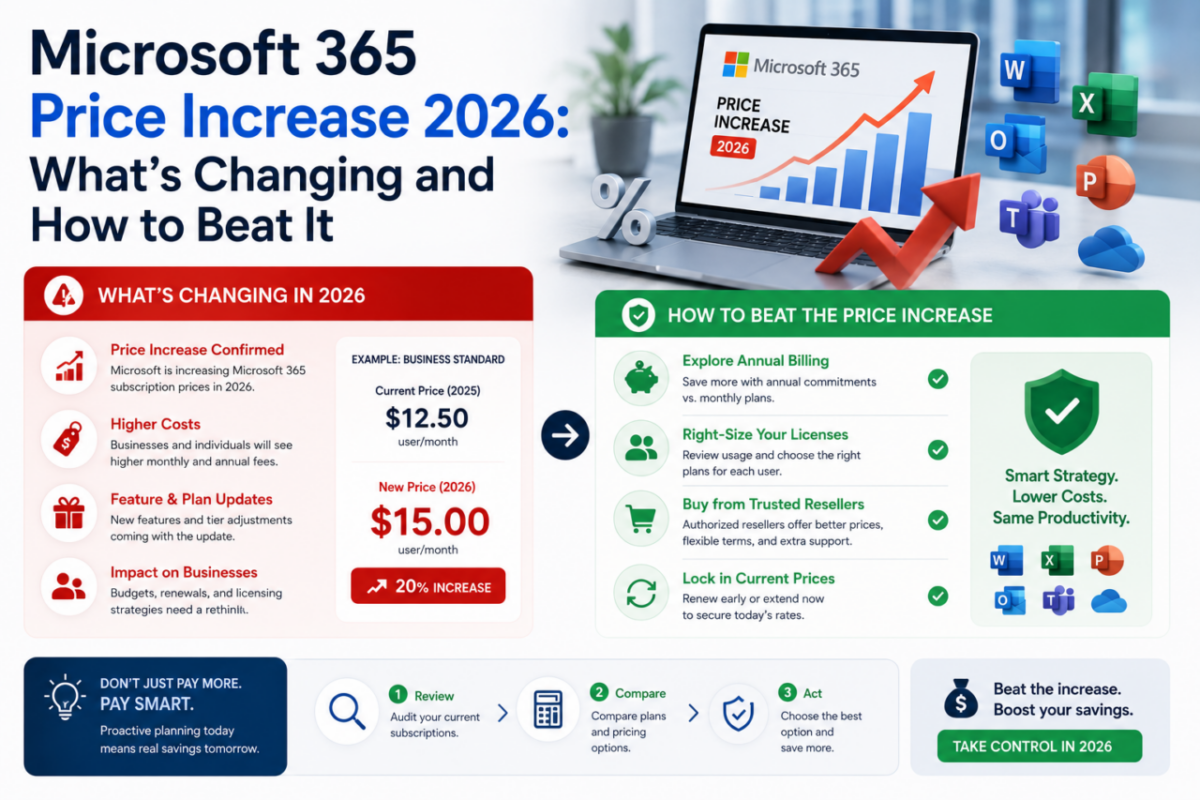
Microsoft has confirmed a global price increase across its Microsoft 365 and Office 365 commercial plans, and it takes effect on July 1, 2026. Nearly every business plan is going up — and on the consumer side, prices already jumped in 2025 when Copilot was bundled in. So whichever plan you’re on, your Office bill is climbing.
The good news? You don’t have to just accept it. Depending on your situation, you can lock in today’s price, skip the subscription model entirely, or simply get the same software for far less. The deadline is real, though, so the time to decide is now rather than at your next renewal.
Below, we break down exactly what’s changing on July 1, why Microsoft is raising prices, and the three concrete ways to beat the Microsoft 365 price increase before it hits your card.
The deadline: July 1, 2026
After that date, new and renewing Microsoft 365 commercial subscriptions pay the higher rates. Your three ways to beat it:
1️⃣ Lock in current pricing — renew before July 1
2️⃣ Switch to a one-time license — never face a hike again
3️⃣ Get Microsoft 365 here — already far below Microsoft’s price
What’s changing on July 1, 2026
Microsoft announced the update back in late 2025, and it touches almost every commercial plan. Specifically, the headline changes for business subscriptions look like this:
New monthly per-user prices (from July 1, 2026):
Business Basic → $6 to $7
Business Standard → $12.50 to $14
Office 365 E3 → $23 to $26
Microsoft 365 E3 → $36 to $39 (E5 tiers rise too)
That may sound small per seat, but it adds up fast. A 40-person team on Business Standard, for example, pays roughly $700 more every year. Moreover, existing customers only keep today’s price until their next renewal after July 1 — once you renew past that date, the new rate locks in.
Why is Microsoft raising prices?
The reason is mostly AI. Over the past year Microsoft has packed Copilot and more than a thousand new features into its Microsoft 365 plans, and now it’s charging for that investment. In other words, you’re paying more whether or not you actually use the new AI tools.
For many users, that’s the frustrating part. If your team mainly writes documents, builds spreadsheets and sends email, the extra AI layer adds cost without adding much value. Consequently, this is the perfect moment to ask whether a subscription is still the right model for you.
3 ways to beat the Microsoft 365 price increase
You have real choices here, and each one keeps money in your pocket. Pick the route that fits how you work.
1. Lock in current pricing before July 1
If you’re staying on a subscription, the simplest move is to renew before the deadline. Many sellers let you renew early at today’s rate, which secures the lower price for another full term. Therefore, acting now buys you a year at the old price instead of the new one.
2. Switch to a one-time license and never face a hike again
The cleanest way to escape rising fees is to stop renting altogether. Office 2024 Professional Plus is a perpetual license — you pay once, own it for life, and no annual increase can ever touch you. On our store it’s $45.90, versus the roughly $250 Microsoft charges for a one-time license.
3. Keep Microsoft 365 — but pay far less
Maybe you genuinely want the cloud: 1 TB of OneDrive per user, apps on every device, automatic updates. That’s fine — you just don’t need to pay Microsoft’s rising price for it. Our Microsoft 365 plan covers 5 users for a full year at $29, which works out to under $6 per user for the whole year.
Which option is right for you?
It comes down to how you work. If you rely on cloud collaboration and want the latest features, grab the discounted Microsoft 365 plan and enjoy the savings. If instead you mainly need Word, Excel and PowerPoint on your PC, a one-time Office 2024 license frees you from renewals for good.
Either way, the key is timing. Because the increase lands on July 1, every week you wait narrows your options. So decide your route now, act before the deadline, and keep your Office costs under control.
The bottom line
The Microsoft 365 price increase is official, global, and arriving on July 1, 2026. Fortunately, you’re not stuck paying more. You can lock in today’s rate, switch to a one-time license that never goes up, or get Microsoft 365 here for a fraction of Microsoft’s price.
Ultimately, this is a rare moment where a little planning saves real money for years. Make your move before the deadline — and stop letting subscription hikes decide your budget.
Beat the July 1 price hike.
Pay once with Office 2024 Professional Plus ($45.90), or get Microsoft 365 for 5 users at $29/year. Genuine licenses, official activation, instant delivery — before prices rise.
Complete your setup and save more:





