Microsoft Project 2024: Which Edition You Need and How to Get It Cheaper
July 3, 2026
Logic Pro in 2026: Pro Music Production Without the Subscription
July 10, 2026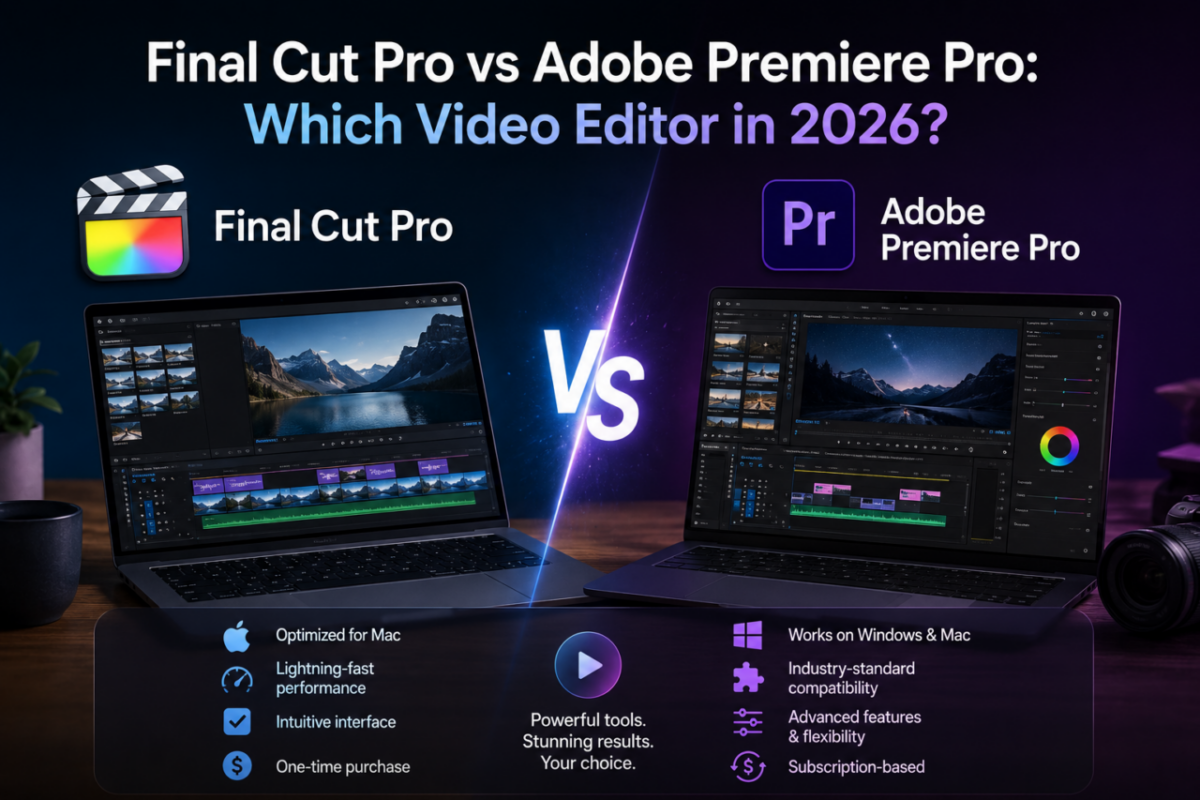
If you edit video on a Mac, sooner or later you face the big decision: Final Cut Pro vs Adobe Premiere Pro. Both are professional-grade editors used on everything from YouTube channels to feature films. However, they take opposite approaches — one is a one-time purchase, the other a never-ending subscription.
That single difference shapes the whole choice. Final Cut Pro is built and optimized for the Mac, bought once and owned forever. Premiere Pro, on the other hand, runs on Windows and Mac, plugs into the entire Adobe ecosystem, and bills you every month for as long as you use it.
So which one actually fits your workflow and budget? Below, we compare Final Cut Pro vs Premiere Pro honestly — strengths, costs over time, and who should pick which — so you can edit smarter without overpaying.
Pay once vs pay forever
Final Cut Pro — one-time
$269.99 once · Mac · no subscription
Adobe Premiere Pro — subscription
~$22.99/month · Windows & Mac · forever
Final Cut Pro vs Premiere Pro: the core difference
The split is about ownership and platform. Final Cut Pro is a one-time purchase that lives natively on macOS, tuned to squeeze every bit of performance from Apple Silicon. Premiere Pro, by contrast, is a cross-platform subscription that runs on both Windows and Mac and ties into Adobe’s wider toolset.
Consequently, the decision often comes down to two questions: do you work only on a Mac, and do you prefer paying once or paying monthly? Answer those, and the right editor usually becomes obvious.
Where Final Cut Pro wins
Final Cut Pro shines for solo creators, YouTubers and Mac-first editors. Because Apple builds it specifically for its own hardware, it feels remarkably fast — smooth playback, quick exports and a magnetic timeline that keeps clips organized without gaps.
Final Cut Pro strengths:
✔ One-time purchase — no monthly fees, ever
✔ Optimized for Apple Silicon Macs (blazing exports)
✔ Magnetic timeline for fast, clean editing
✔ Excellent for YouTube, social and solo creators
✔ Simple, focused interface with a gentle learning curve
In short, if your world is macOS and you’d rather own your editor outright, Final Cut Pro is hard to beat. You pay once and keep editing for years without another invoice.
Where Premiere Pro wins
Premiere Pro remains the industry standard, and for good reason. It runs on Windows and Mac alike, supports virtually every format, and integrates tightly with After Effects, Audition and the rest of Creative Cloud. For teams and multi-app pipelines, that connectivity matters a lot.
Premiere Pro strengths:
✔ Cross-platform — Windows and Mac
✔ Deep integration with After Effects and Creative Cloud
✔ Industry standard for studios and collaboration
✔ Broad format and plugin support
✔ Always updated with the latest features
However, all of that comes on a subscription. As long as you edit, you keep paying — and if you ever stop, your access ends. For studios it’s worth it; for many solo creators, it’s a recurring cost they’d rather avoid.
The real cost over time
Money makes the contrast stark. Final Cut Pro costs $269.99 once on our store. Premiere Pro runs about $22.99 a month — roughly $275 every year, forever. Therefore, the gap widens with each passing year you keep editing.
Cost comparison:
Year 1 → Final Cut Pro: $269.99 | Premiere Pro: ~$275
After 3 years → Final Cut Pro: $269.99 | Premiere Pro: ~$825
By year two, Final Cut Pro has already paid for itself
Which should you choose?
It comes down to platform and workflow. If you edit on a Mac, work mostly solo, and want to own your software, Final Cut Pro is the clear winner — buy it once at $269.99 and you’re set. If you need Windows support, heavy After Effects integration, or studio collaboration, Premiere Pro earns its subscription — and you can get Adobe for less through our Creative Cloud licenses.
Ultimately, both are excellent editors. The smart move is matching the tool to your reality rather than overpaying for features or platforms you don’t use.
Edit like a pro — your way.
Own Final Cut Pro outright for $269.99, or go Adobe with our cheaper Creative Cloud licenses. Genuine, official activation, instant delivery.
For Mac creators: